Security and privacy
Your patients’ records stay in your clinic.
Ortho-Doc-Assist runs on your own computer. This page sets out exactly where each kind of information is kept and what the software does to protect it — no more, and no less.
Where each kind of information lives
- Patient recordsVisits, prescriptions, documents, images and certificates
- On your clinic computer, or on the one computer you make your clinic server. They are not sent to us.
- BackupsMade automatically every day and checked for integrity
- On the same computer, with an optional second copy to a place you choose.
- Voice dictationThe sound of your voice while you dictate
- Turned into text by your browser’s speech service (Google for Chrome, Microsoft for Edge), so it leaves your computer. The text that comes back stays local.
- AI featuresOptional, and off until an administrator switches them on
- Run on your own computer. Cloud AI models are refused.
- Your account and licenceEmail, clinic name, licence status and the names of activated computers
- Our account service, hosted in the Mumbai region of India.
- PaymentsCard, UPI and net-banking details
- Handled by Razorpay. We never receive them.
The full detail, including exactly what the app sends when it checks its licence, is in our Privacy Policy.
Inside the app
Access is personal, and what each person did is recorded.
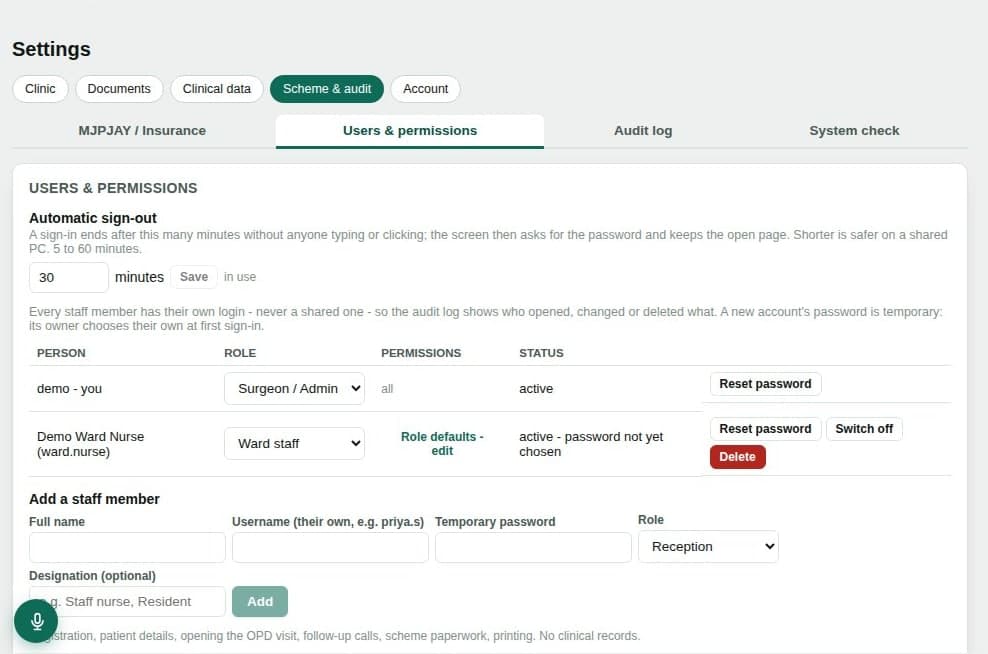
- Every staff member signs in with their own account — never a shared one.
- Roles for surgeon/administrator, reception, assistant and ward staff, with permissions you can adjust per person.
- Repeated wrong passwords slow further attempts. Passwords are stored as hashes, never as text.
- An idle screen asks for the password again after 5 to 60 minutes — you choose.
- An audit log of sign-ins, changes, prints and AI requests.
- Finalised certificates are locked, and finalising needs your password.
- Other computers join the clinic network with a one-time code, over encrypted connections, and can be removed at any time.
Your part
Because the records live on your computer, protecting that computer protects your patients. We recommend:
- 1Give every person their own Windows sign-in on the clinic computers.
- 2Turn on Windows device encryption (BitLocker) on the computer that holds the records, so a lost or stolen computer does not expose them.
- 3Keep the second backup copy on a drive kept somewhere safe, away from the computer.
- 4Keep Windows updated, and never share Ortho-Doc-Assist logins between staff.
Ortho-Doc-Assist is clinical documentation and workflow software. It does not diagnose patients or replace clinical judgement. All clinical decisions remain with the treating doctor. Questions about your data? Write to eknathnavsagar@med-doc.in.